• Hotspot Shield is a tools which helps you to connect tio the internet via VPN (Virtual Private Network) and protects your device from online malware and many unwanted threats.It is one of the biggest VPN service and trusted service in the world.

  • Internet Download Manager is a smart software that helps you to download any large or small file with high speed that up to 5x.

  • This Activator for Windows 8.1 which is a version of Windows 8 and supports x64 & x86 . It is used in PC or windows phone. This activator file is used to activate windows 8

  • Kaspersky Antivirus is a Software that used to protect computer from known & Emerging threats,spam,Dangerous viruses & other unwanted content.It keeps your computer fresh

New Post

Rss

Showing posts with label FaceBook. Show all posts
Saturday, May 17, 2014
How To Make Single Name Account On Facebook

How To Make Single Name Account On Facebook


Many people doesn't know how to create a single name in Facebook account but they want to do this. It's very easy to do this by following some steps.

Steps


  •  Log in your Facebook account.


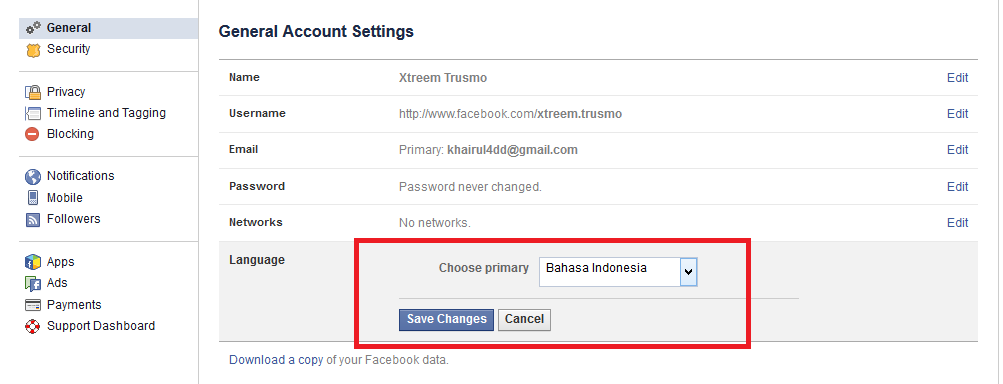
  • Go to settings >> Language   and  change the Language English to Bahasa Indonesia.


  • Then change your proxy at your browser and use it.

        You can use those proxy:

        >>IP : 118.97.206.254        Port : 3128
        >>IP : 27.111.38.253          Port : 8080
        >>IP : 119.235.16.41          Port : 8080
        >>IP : 202.152.156.210       Port : 8080


  •  Then Edit your name . Here you just fill in the 1st blanks using your first name and no need to fill up the middle and last name. you should keep that blank and then enter your password where needed to save this change.
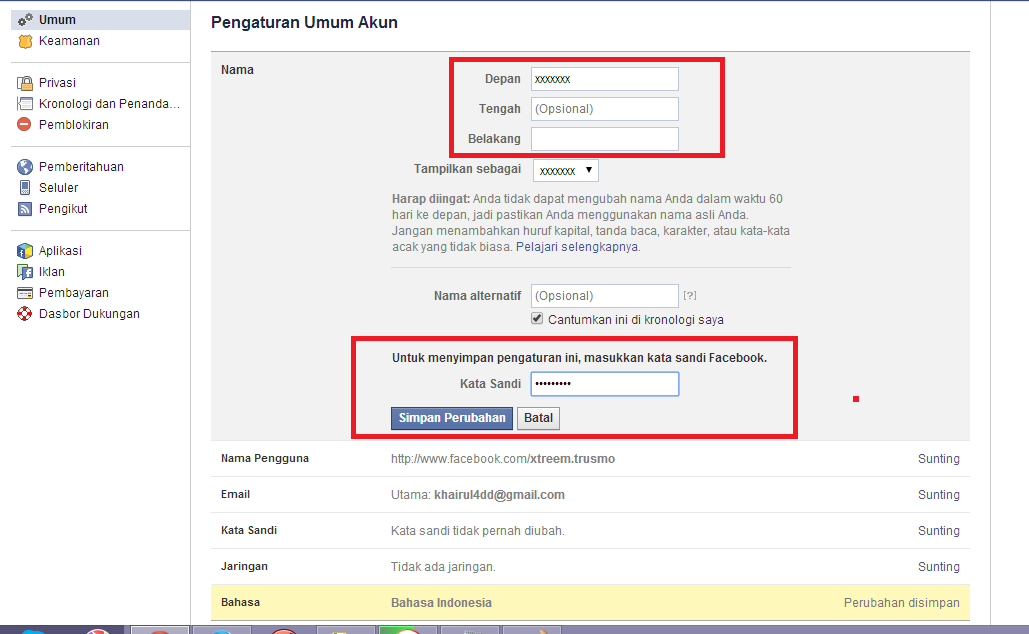


  • After change the name you should log out and then log in your account again and   change the Language Bahasa Indonesia to English .

I should to inform you that sometimes those IP address doesn't worked. So you can search in Google to find out the proxy. This is good to search and "Indonesian proxies" in Google.


Note : Prevent your Facebook account from getting Hacked


That's all. Thanks for visiting here...
Friday, May 16, 2014
Prevent Your Facebook Account From Being Hacked

Prevent Your Facebook Account From Being Hacked


Now a days Facebook is a famous social  site in the world. It is one of the best site to communicate at one place to another in the world easily . But Now a days, the facebook hacking process are increasing day by day and also hacked. Any people or your friends can try to surprised you or collect your facebook documents or many causes by hacking your facebook account. So it is very important to Prevent Your Facebook Account from being Hack


You can prevent your facebook account by following some instructions :

  • Go to the "facebook(.)com" and Sign Up her by fill in the blanks properly.
  • Add your email which is you are using lile "username@example.com" .


  • Password is given for keep this account secure. So it's important to give here a strongest password. You can make your password strong by giving a large password and also the combination of characters or letters or Numbers or special characters like "845%IT3456".
  • Then click to sign up and if the ask a security Question.,thats important to choose a question and answer to a good security question which Is memorable, Simple , Cannot be easily guessed or researched and Doesn't change overtime.
  • Now you should go to your email address and confirm your account.
  • Then log in your account and go to Settings-> General-> Email and here add another email id and save it.


  • Go to Privacy Settings -> Who can see my stuff?-> Who can see your future posts? and select the "Friends" Option. Ensure-that you accept only persons you know-as-your-friends as when you accept strangers, you allow them to access your personal-information.Because its always good to avoid_posting any Personal or Financial details.


  • It's good to Change Password regularly and use an unique passwords. If any doubt of your fb account,  it's important to change your password.


  • Go to Security Settings-> Trusted Contacts. and choose here two or three or more contacts which helps you to find your account if hacked. Don't Forget those contacts.


  • Go to Security Settings->Login Notifications and select email or Text message or both and save it . It helps you to know when your account is accessed from a computer or mobile device that you haven't used before.The Facebook Company will notify you by email or Text message or both.


  • Don't click on any links of apps,games and others that you are not sure of. You should Avoid-permitting third party apps which or who accessing your information.
  • Sometimes someone can send you a spam email or any spam link. You should avoid this and Don't Click any unknown link.
I think this steps may keep your  facebook account secure . And be careful from being your facebook account hacked.

Video


Thanks for visiting here....
Copyright © 2012 IT Cloud All Right Reserved